My Development Setup, Part 0: The Tools I Use
Published on June 5, 2025
For a while, I've wanted to write about the tools I use, my dotfiles, and share an overview of my workflow. I like to obsess over these things.
For me, having nice, memorable shortcuts, a scalable way to structure projects, and a workflow I can have fun with is non-negotiable. I don't change my setup too frequently, but when I do, I feel like a sculptor, patiently carving my dotfiles piece by piece.
lucasgoyeche/dotfiles
My personal configuration files for fish, tmux, AeroSpace, and more.
Core Tools
Whether I'm on Linux, Windows, or MacOS, I need a tiling window manager. In short, it allows you to change workspaces with the press of a key, move windows around, stack them on top of each other, or even more complex stuff.
On MacOS, I use AeroSpace. It's an i3-like tiling window manager for MacOS. It's pretty good. I have a pretty default config, this is how I typically work:
🚀 Interactive Workspace Demo
Click the workspace numbers to see how I organize my work
Browser
| Shortcut | Action |
|---|---|
| ⌥N | Where N is 1-5, takes me to workspace N |
| ⇧⌥N | Moves the current window into workspace N |
| ⌥, | Stack layout |
| ⌥/ | Split layout |
That's it. I typically have my browser in workspace 1, terminal on 2, and notes on 3. If I have a DB client, I open it on 4, but that's about it.
I take a ton of inspiration from ThePrimeagen's workflow, he explains it very well:
I'm like: 'I need to go my browser' — I JUST DO IT!
I don't have to think about it. I don't have to do any sort of mental overhead.
I've been using the exact same setup for years now, to the point where it's just MUSCLE MEMORY.
My SPINAL CORD responds to my thinking (...)
I'm just like 'TERMINAL!' *summons terminal*
— ThePrimeagen
The rest of my setup is pretty simple:
- For any terminal-based apps, I use tmux, with the default config.
- I use fish as my shell, I find it very simple and powerful.
Why tmux?
I like it. It's simple, provides keyboard shortcuts for everything, and I can switch between sessions with just a few keystrokes.
Why fish?
Great defaults compared to other shells, and minimal config for the things I really need. Any shell works for me though, if something new comes out that's even simpler and more attractive, I will switch.
Folder structure for projects
Instead of having to think where to place new projects, I use ghq. Whenever I need to clone a new repo, I run:
ghq get github.com/org_name/repo_name ~/ghq/
├── github.com/
│ ├── microsoft/
│ │ ├── vscode/
│ │ └── typescript/
│ ├── vercel/
│ │ ├── next.js/
│ │ └── swr/
│ └── your-org/
│ ├── awesome-project/
│ └── another-repo/
├── gitlab.com/
│ └── company/
│ └── private-repo/
└── bitbucket.org/
└── legacy-stuff/
└── old-project/
The repo will then get cloned into ~/ghq/github/org_name/repo_name. To choose projects, I have a small fish function that I invoke when pressing ^P on a terminal.
function ghq_tmx
    set current_session NONE
    set tmux_running (tmux list-sessions 2>/dev/null)
    if test "$TERM_PROGRAM" = tmux
        set current_session (tmux display -p '#{session_name}')
        set inside_tmux true
    end

    # Run `ghq list` with fzf, but exclude the current tmux session from the list
    set selection (ghq list | grep -v "$current_session" | fzf --reverse --preview-window bottom:50% --preview "
        set folder_name (basename {})
        if test -n "$folder_name"
            if tmux has-session -t $folder_name 2>/dev/null
                tmux capture-pane -t $folder_name -e -p -S -
            else
                ls -1 (ghq root)/{}
            end
        else
            echo 'No folder name extracted, running ls instead'
            ls -1 (ghq root)/{}
        end
    ")

    # If nothing is selected, exit
    if test -z "$selection"
        return
    end

    # Extract the folder name (last segment of the path)
    set folder_name (basename $selection)

    # Check if we're already inside a tmux session
    set session_info "$current_session"
    if test -n "$session_info"; and test "$inside_tmux" = true
        # We're already in a tmux session, check if it's the desired one
        if test "$session_info" != "$folder_name"
            # Detach from the current session before switching or creating a new one
            # Check if the desired session exists
            if tmux has-session -t $folder_name 2>/dev/null
                # Switch to the existing session
                tmux switch-client -t $folder_name
            else
                # If the session doesn't exist, create it without attaching
                tmux new-session -A -s $folder_name -c (ghq root)/$selection -d
                tmux switch-client -t $folder_name
            end
        end
    else
        # Not in a tmux session, create and attach to the session
        tmux new-session -A -s $folder_name -c (ghq root)/$selection
    end
end

# Bind the function to CMD+P (Escape + p)
bind cp ghq_tmx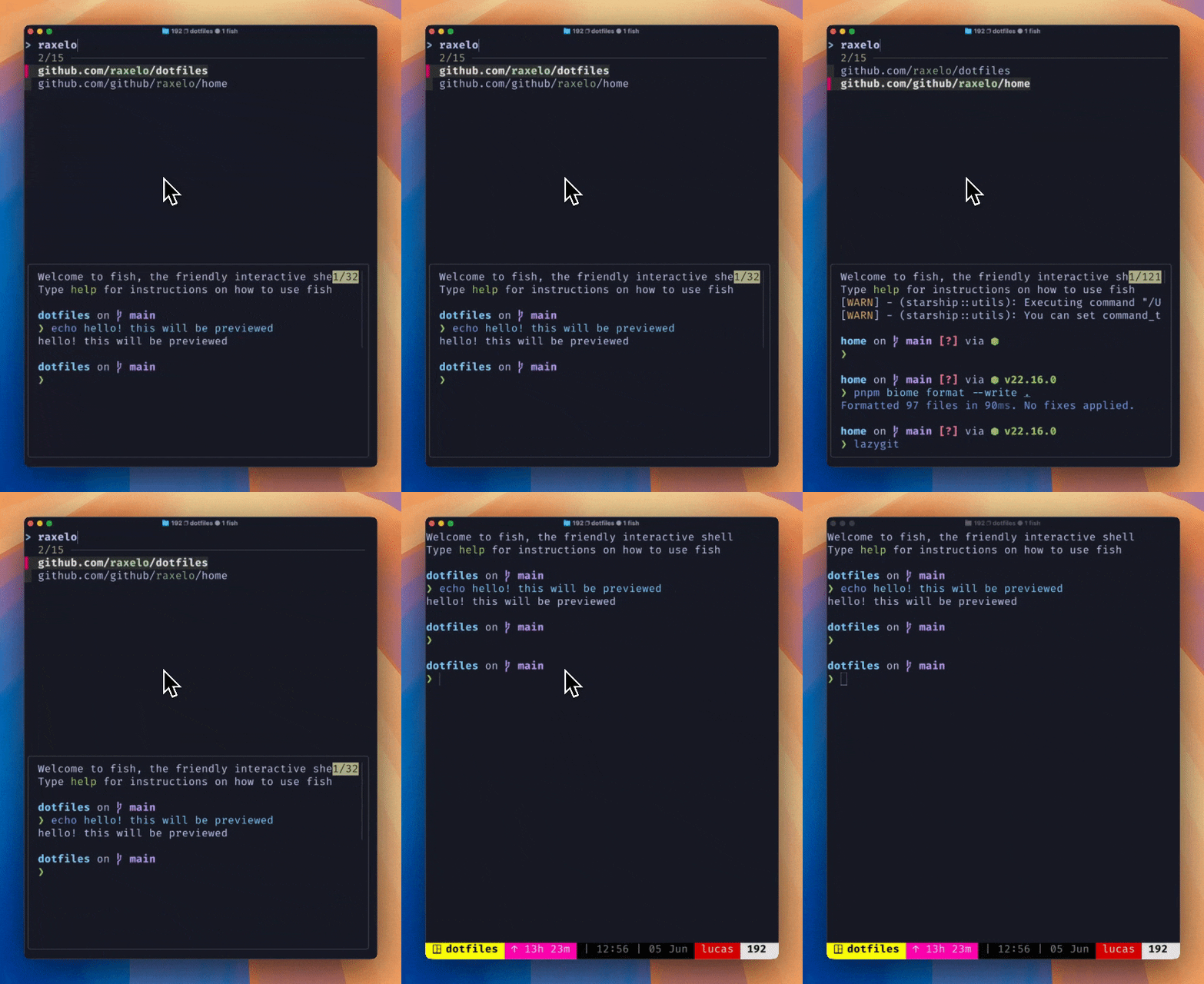
The function shows all of my ghq projects and uses fzf to show a picker. After choosing a value from the list, I get moved into a new (or existing) tmux session for that directory.
This is great because I have long-lived sessions and tmux keeps my panes/windows intact, even if I close my terminal, plus the added benefit of not having to think where to spawn my tmux sessions or how to name them.
That's an overview of the tools I use. I want to share more about my IDE and other shortcuts, but I'll save that for another post :)
Next up: My IDE setup, custom shortcuts, and the dotfiles that make it all work together.